Server (chap-checker serve)
chap-checker serve
# 2026-05-16 11:59:10 INFO chap_checker.serve: serving dashboard + API on http://127.0.0.1:8765
# 2026-05-16 11:59:10 INFO chap_checker.serve: config: ./chap-checker.toml
# 2026-05-16 11:59:10 INFO chap_checker.serve: interval: 30.0s; alerts: off
# INFO:     Started server process [57114]
# INFO:     Application startup complete.
# INFO:     Uvicorn running on http://127.0.0.1:8765 (Press CTRL+C to quit)
# 2026-05-16 11:59:10 INFO chap_checker.daemon: refresh: 4/4 targets ok in 384ms
# 2026-05-16 11:59:18 INFO chap_checker.serve.access: 127.0.0.1 "GET /api/state HTTP/1.1" 200 2081 0.6ms ua="curl/8.7.1"
Long-running daemon. Runs the check loop on its own schedule, dispatches
alerts (when --alerts), exposes the snapshot as JSON at /api/state,
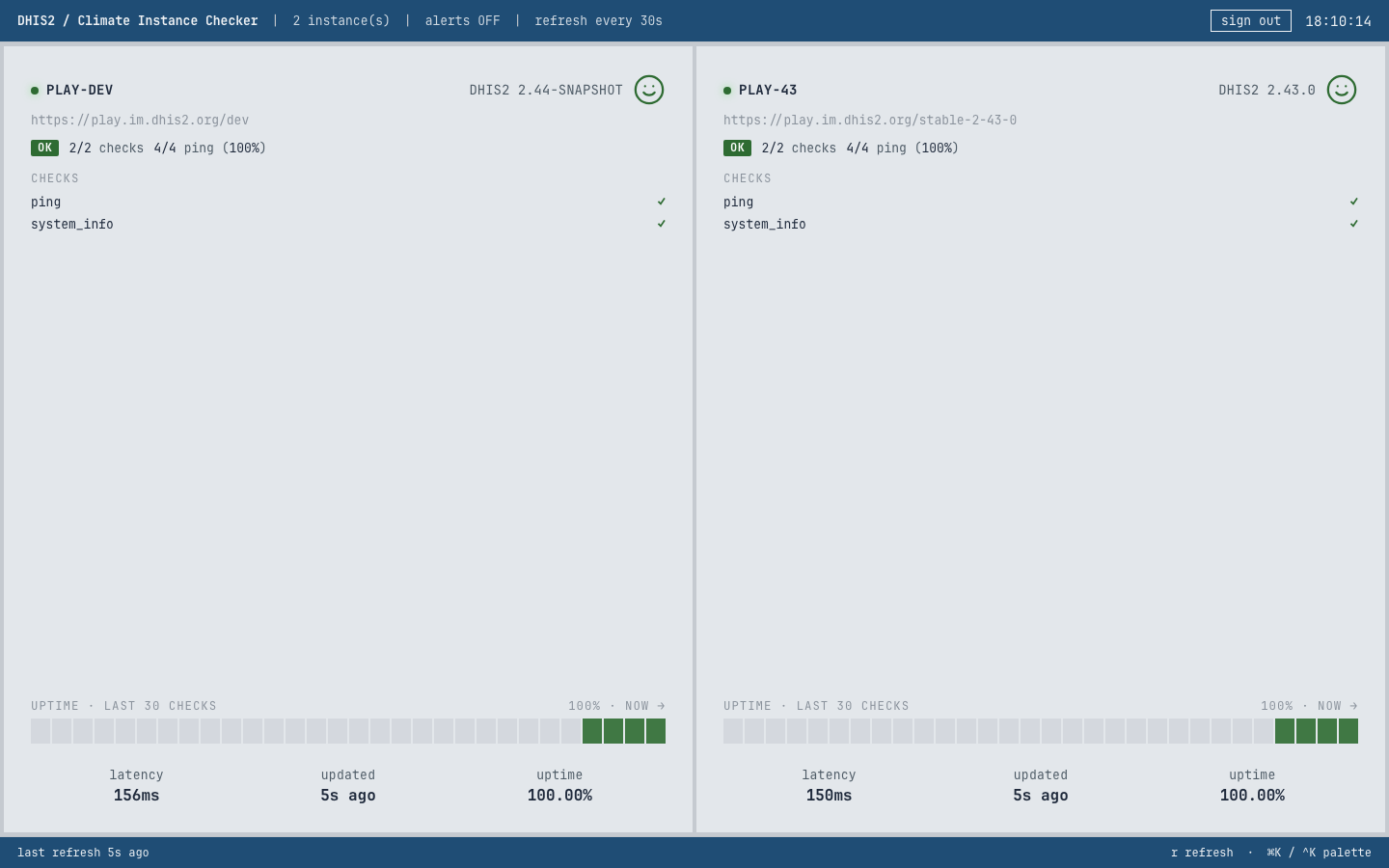
and by default serves a browser dashboard at /. Both the TUI in
--connect mode
and any browser pointed at this server consume the same snapshot.
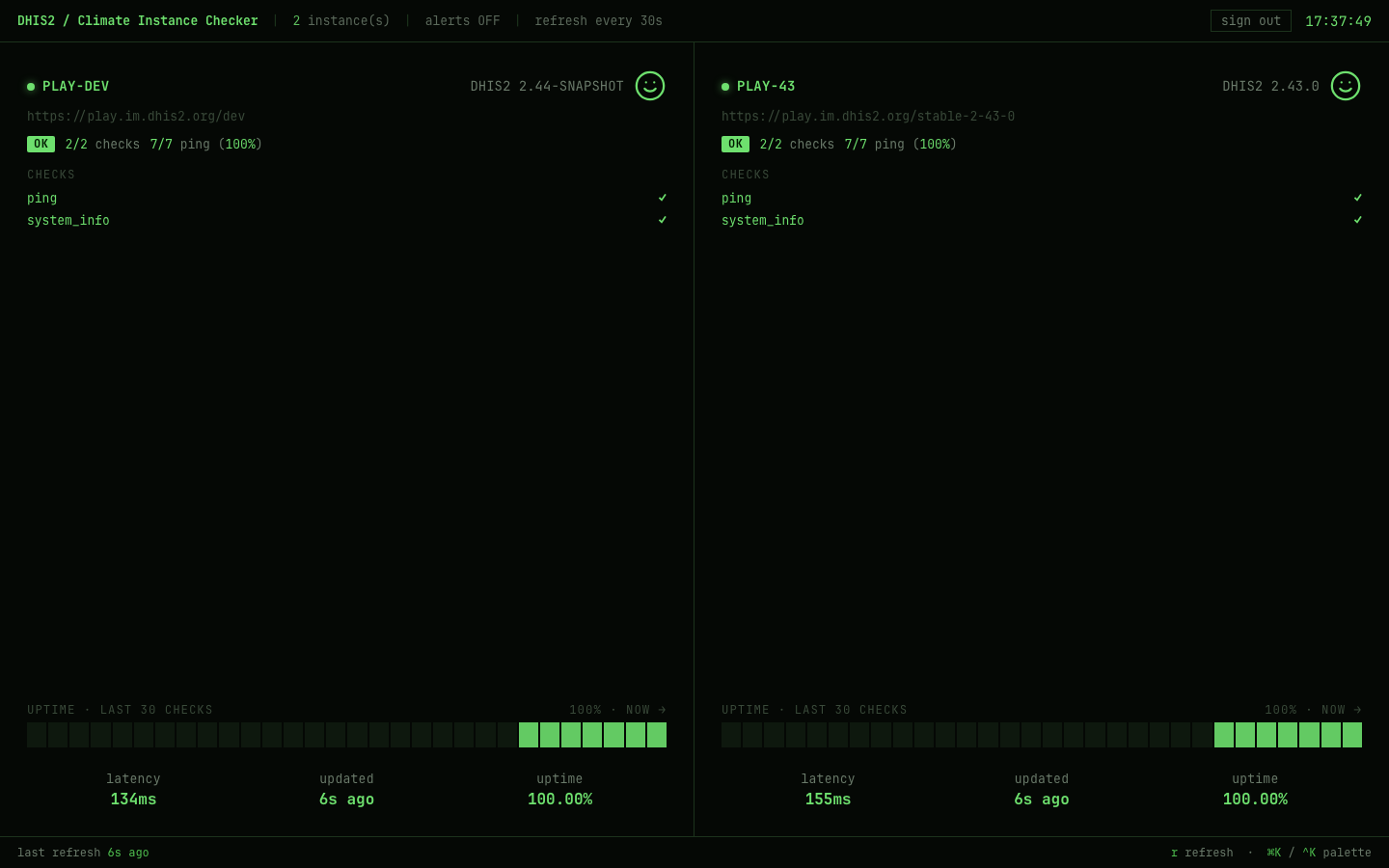
The dhis2 theme (light mode, DHIS2 blue strip) for embedding in a DHIS2
operations setup:
Keys (browser)
| Key | Action |
|---|---|
r |
Refresh the snapshot from the server now. |
f |
Toggle browser fullscreen. |
Ctrl+K / ⌘K |
Open the command palette. |
Esc |
Close the palette. |
↑ / ↓ |
Move the active item in the palette. |
Enter |
Run the active palette command. |
The command palette currently exposes:
- Refresh now
- Reload config — POST
/api/reload; re-readschap-checker.tomland swaps targets / cfg in place. The next/api/statepoll picks up any new / removed instance tiles automatically. Also reachable via the reload config button in the header next to the clock. - Toggle fullscreen
- Density: default / comfortable / TV / wall
- Theme: phosphor green / amber / high contrast / tokyo / dhis2
- Open GitHub repository
- Open documentation
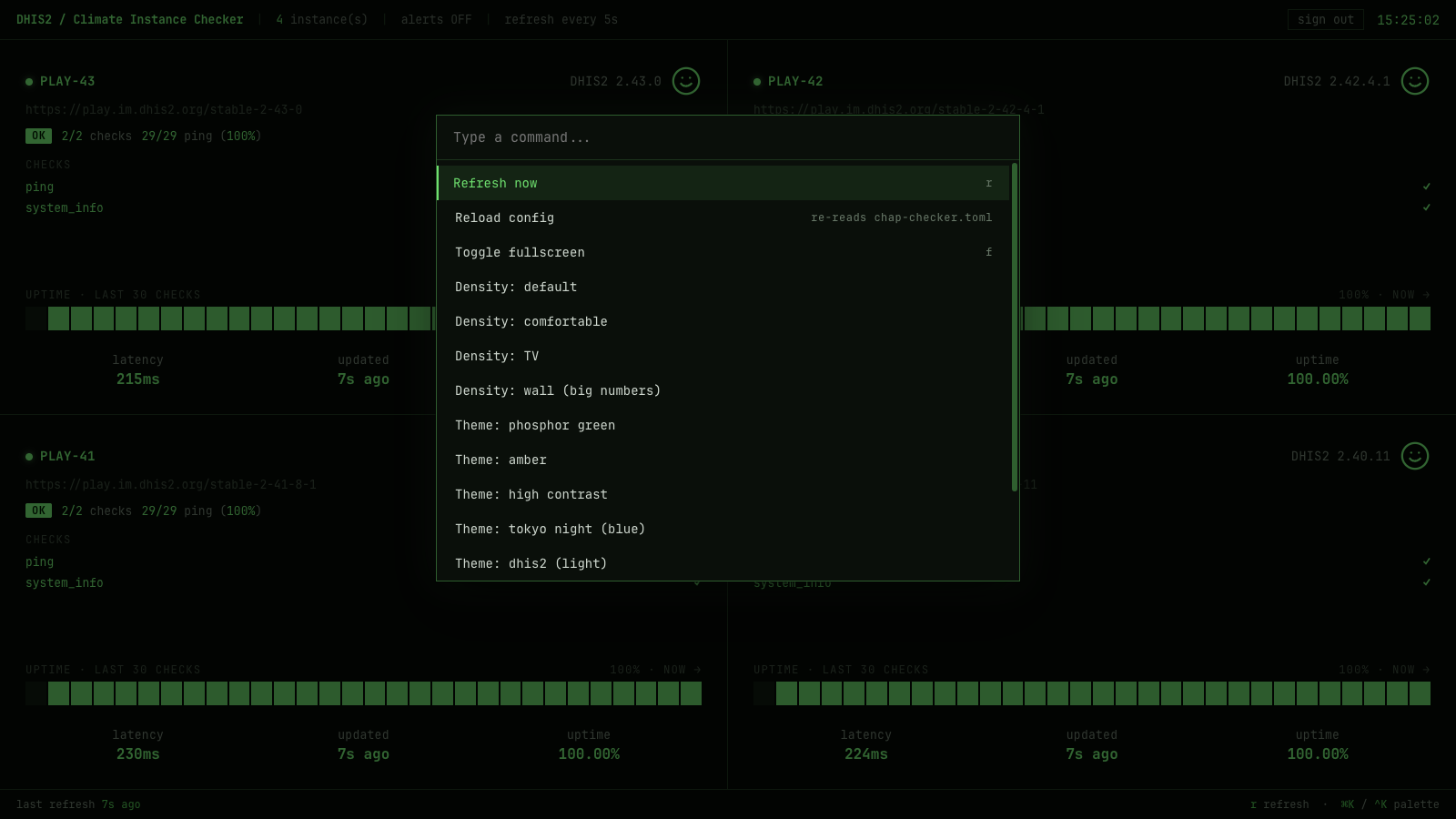
The TUI ships the same commands via
Textual's built-in palette (Ctrl+P), so the same muscle memory works
in both surfaces.
Headless mode
Skips the browser dashboard — GET / returns 404 and the static
web_ui/ mount is not registered. Everything under /api/* is
unchanged. Use this for headless deployments where only
chap-checker tui --connect clients or external scrapers consume the
state, or where the dashboard lives behind a separate static-file host.
Connect from a remote TUI
# On the daemon host:
chap-checker serve --host 0.0.0.0 --alerts

# On the laptop:
chap-checker tui --connect http://daemon-host:8765
The TUI in --connect mode does not load a config or run any checks; it
polls the daemon's /api/state each refresh tick. Multiple TUIs +
browsers can connect simultaneously without doubling alerts or
diverging numbers — the daemon is the single source of truth.
Logs
The daemon logs at INFO level by default:
- Startup banner (host, port, config, interval, alerts)
- Uvicorn's own startup chatter
- One line per refresh cycle from
chap_checker.daemon(e.g.refresh: 4/4 targets ok in 384ms) - One
chap_checker.serve.accessline per HTTP request:client "METHOD path HTTP/1.1" status bytes Xms ua="..."
Logs go to stderr. Pipe to your usual log shipper, or let systemd
capture them as below.
Running under systemd
For a TV machine or small VM that should serve a dashboard 24/7, the operator playbook is:
- Install with
uv tool install chap-checker(puts the binary in~/.local/bin/chap-checker) or use the absolute path returned bywhich chap-checker. - Put the config somewhere the service user can read, e.g.
/etc/chap-checker/chap-checker.toml, owned by the service user withchmod 0600(the file carries credentials). - Drop a unit file at
/etc/systemd/system/chap-checker.service:
[Unit]
Description=chap-checker daemon (DHIS2 health checks + browser dashboard)
Documentation=https://dhis2-chap.github.io/chap-checker/
After=network-online.target
Wants=network-online.target

[Service]
Type=simple
User=chap-checker
Group=chap-checker
WorkingDirectory=/etc/chap-checker
# Adjust the binary path: `which chap-checker` or `which uvx`.
ExecStart=/home/chap-checker/.local/bin/chap-checker serve \
    --config /etc/chap-checker/chap-checker.toml \
    --host 0.0.0.0 \
    --port 8765 \
    --alerts
Restart=on-failure
RestartSec=5

# Logs land in the journal:
#   journalctl -u chap-checker -f
StandardOutput=journal
StandardError=journal

# Reasonable hardening defaults; loosen only what your config needs.
NoNewPrivileges=true
PrivateTmp=true
ProtectSystem=strict
ProtectHome=read-only
ReadWritePaths=/etc/chap-checker
ProtectKernelTunables=true
ProtectKernelModules=true
ProtectControlGroups=true

[Install]
WantedBy=multi-user.target
- Enable and start:
sudo systemctl daemon-reload
sudo systemctl enable --now chap-checker
sudo systemctl status chap-checker
journalctl -u chap-checker -f
- To pick up a config edit without a full restart:
Or Ctrl+R in the TUI / "Reload config" in the browser palette.
Notes:
ReadWritePaths=/etc/chap-checkeris needed because the daemon writes the state file next to the config (override with--state /var/lib/...if you'd rather keep/etcstrictly read-only).- Webhook URLs and DHIS2 credentials should live in environment files,
not in the config when running under systemd. Add
EnvironmentFile=/etc/chap-checker/chap-checker.envand reference them in the config aspassword_env = "..."/webhook_url_env = "...". The env file must bechmod 0600and owned by the service user.
macOS launchd
Same idea, different file format. Drop a plist at
~/Library/LaunchAgents/io.dhis2.chap-checker.plist:
<?xml version="1.0" encoding="UTF-8"?>
<!DOCTYPE plist PUBLIC "-//Apple//DTD PLIST 1.0//EN" "http://www.apple.com/DTDs/PropertyList-1.0.dtd">
<plist version="1.0">
<dict>
  <key>Label</key><string>io.dhis2.chap-checker</string>
  <key>ProgramArguments</key>
  <array>
    <string>/Users/you/.local/bin/chap-checker</string>
    <string>serve</string>
    <string>--config</string><string>/Users/you/.config/chap-checker.toml</string>
    <string>--host</string><string>0.0.0.0</string>
  </array>
  <key>RunAtLoad</key><true/>
  <key>KeepAlive</key><true/>
  <key>StandardOutPath</key><string>/Users/you/Library/Logs/chap-checker.log</string>
  <key>StandardErrorPath</key><string>/Users/you/Library/Logs/chap-checker.log</string>
</dict>
</plist>
Then launchctl load ~/Library/LaunchAgents/io.dhis2.chap-checker.plist.
Flags
chap-checker serve --port 8000
chap-checker serve --host 0.0.0.0           # expose on the LAN for a TV
chap-checker serve --interval 10            # check every 10s instead of 30
chap-checker serve --alerts                 # also dispatch Slack on transitions
chap-checker serve --no-ui                  # API-only, no browser dashboard
chap-checker serve --config /etc/chap-checker.toml
| Flag | Purpose |
|---|---|
--config <path> / -c |
Override the default ./chap-checker.toml. |
--interval <seconds> |
Server-side check refresh interval. Default 30, minimum 2. |
--alerts / --no-alerts |
Dispatch Slack alerts from refresh cycles. Off by default. |
--ui / --no-ui |
Serve the browser dashboard at /. Default on. |
--host <addr> |
Bind address. Default 127.0.0.1; use 0.0.0.0 for LAN exposure. |
--port <port> |
TCP port. Default 8765. |
--state <path> |
State file path (only relevant when --alerts is on). |
Themes & density
The command palette exposes two runtime tweaks for the look:
- Themes:
phosphor green(default),amber,high contrast,tokyo night,dhis2(light mode with the DHIS2 blue strip). - Density:
default,comfortable,TV,wall (big numbers).
Defined as CSS custom-property bundles in
src/chap_checker/web_ui/src/app.jsx
(THEMES, DENSITY) and applied by applyTheme() on every tweak
change. Selections live in React state for the session; a page reload
resets to the defaults.
Architecture
A small FastAPI app + a React/Babel-standalone SPA. No build step.
src/chap_checker/web_ui/
├── index.html      Loads vendor/React + vendor/Babel + src/*.jsx in order
├── vendor/         React 18.3.1 UMD + Babel 7.29.0 standalone (committed)
├── _state.js       Wiring layer (polls /api/state, maps to artifact shape)
└── src/            Designer artifact (replaced wholesale on next zip drop)
    ├── app.jsx
    ├── card.jsx
    ├── palette.jsx
    └── tweaks-panel.jsx
Living inside the chap_checker package means the assets ship with
both editable installs and built wheels (uv_build picks up everything
under src/chap_checker/ automatically). The page loads no external
resources — React and Babel are vendored under vendor/, no web fonts
are fetched, and the body CSS falls back to the platform monospace
stack — so the dashboard works offline, in air-gapped kiosks, and
behind strict CSP without any third-party trust dependency.
- FastAPI runs the checks on a background
asynciotask every--intervalseconds via the sharedDashboardServerinchap_checker.daemon. GET /api/statereturns the current snapshot as JSON.- The web UI is mounted via
StaticFiles(directory=web_ui, html=False)with a dedicatedGET /handler returningindex.html; skip both with--no-uifor an API-only daemon. _state.jsexposeswindow.CK_useLiveState(pollSec)— a React hook that polls/api/state, maps the server schema to the artifact'sINSTANCES_BASEshape, and returns the latest snapshot.
The browser does not drive the actual probes — they happen on the server on its own schedule. The browser is just a view.
Authentication
Off by default for backwards compatibility, but trivial to opt in: add an [auth] block to your TOML and chap-checker serve will require an Authorization: Bearer <token> header on every request to /api/state and /api/reload. The browser dashboard's SPA shell stays unauthenticated so the built-in login modal can render before a token exists; static assets stay public for the same reason.
Generate and configure a token
In chap-checker.toml:
[auth]
# Inline (NOT recommended for shared configs):
# token = "REPLACE_ME"

# Recommended - export the env var via your secrets manager / systemd
# EnvironmentFile / .envrc / whatever:
token_env = "CHAP_CHECKER_TOKEN"
Restart the daemon. Every call to /api/state now needs the header:
curl http://127.0.0.1:8765/api/state                              # 401
curl -H 'Authorization: Bearer <token>' http://127.0.0.1:8765/api/state   # 200
TUI clients
export CHAP_CHECKER_TOKEN=<the same token>
chap-checker tui --connect http://daemon-host:8765 --token-env CHAP_CHECKER_TOKEN
If you omit --token-env (and the daemon requires auth), the TUI hits its first 401 and pops a centred token-prompt modal — paste the token, press Enter, the dashboard renders. Escape to cancel, which paints the auth-rejected banner instead. The modal stays inside the Textual surface so the operator never leaves the dashboard.
A wrong token (or one rejected mid-session) paints the disconnect banner with "auth rejected by ..." (distinct from a generic "disconnected", so you know the receiver is up but the credential is bad).
chap-checker tui in local mode (no --connect) does not need a token. Local mode runs the check loop itself against DHIS2 — there's no HTTP daemon between the TUI and the data, so [auth] doesn't apply.
Browser
Open the dashboard URL in a browser. First load gets a 401, the SPA renders a login modal in the configured theme, you paste the token, and it's stored in localStorage for the session.
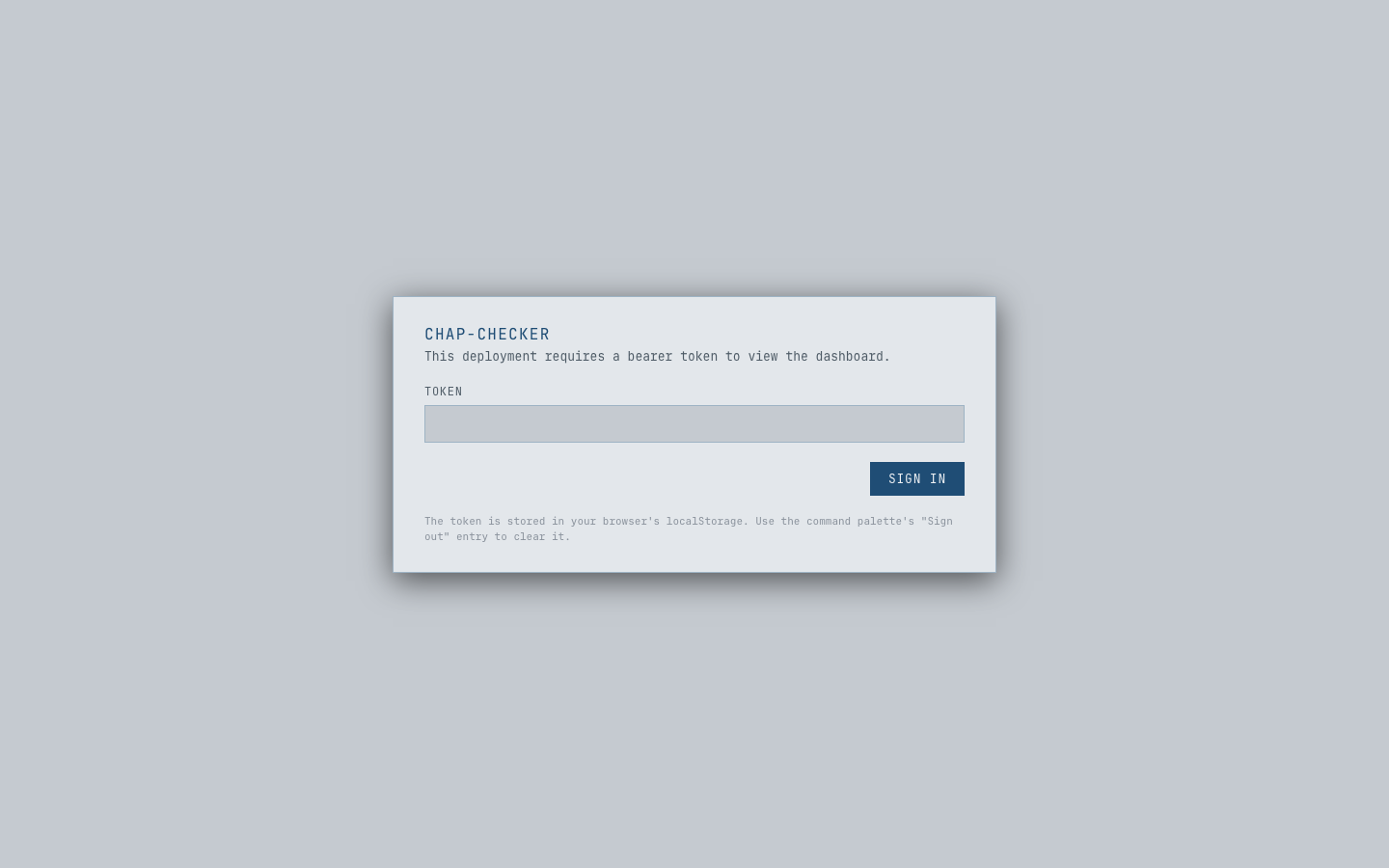
The Ctrl+K / ⌘K command palette has a Sign out entry that clears the stored token and reloads. Once signed in, a sign out button also appears in the dashboard's top-right corner.
Rotation
Two flows depending on which form the daemon is configured for:
- Inline
token— edit the TOML, thenPOST /api/reload(orCtrl+Rin the local TUI). The daemon re-resolves[auth]in place; the new token is in effect on the next request. No restart. token_env— the env-var lives in the daemon's process environment. Updating it in your shell does not propagate to the running daemon, so this flow still needs a restart (or whatever way your supervisor — systemdEnvironmentFile=, launchdEnvironmentVariables, Docker-e, ... — re-launches the process with the new value).
Either way, every existing browser session pops the login modal on its next poll, and every tui --connect client gets the auth-rejected banner until you update its --token-env / --token.
Threat model
Single shared token; no per-user accounts, no audit log per identity, no scope-of-access. Anyone with the token has the same view of the same instances. For stronger isolation — different views for different operators, audit trails, federated SSO — front the daemon with a reverse proxy that does its own auth (nginx + OAuth2-Proxy, Caddy + JWT, Cloudflare Access, ...). Built-in auth and a proxy aren't mutually exclusive.
What's not protected
GET /and the static SPA assets stay public so the login modal can render. The SPA carries no DHIS2 data; it just paints whatever/api/statereturns.GET /api/authis unprotected and returns{"required": true|false}. The SPA reads this on first load to decide whether to attach an Authorization header at all. The endpoint leaks no token material.
Non-loopback warning
If you run serve --host 0.0.0.0 (or any non-loopback bind) without an [auth] block configured, the daemon logs a startup WARNING — the listen socket is reachable from outside loopback and /api/state would be unauthenticated. The bind isn't refused (some operators are behind a reverse proxy / VPN and don't want the warning to be fatal); the nudge is just visible in the logs.
Layout
The grid adapts to the instance count, same logic as the TUI:
| instances | columns |
|---|---|
| 1 | 1 |
| 2-4 | 2 |
| 5-9 | 3 |
| 10+ | 4 |
Tiles use display: flex with margin-top: auto on the stats row so the
bottom strip stays anchored regardless of how many check rows are above it.
TUI vs serve
Same data, two surfaces:
TUI (chap-checker tui) |
Server (chap-checker serve) |
|
|---|---|---|
| Run on | Terminal (SSH, tmux, locally) | Long-running daemon (systemd, VM, TV machine) |
| Refresh model | Drives its own probes | Probes on a background task; clients poll JSON |
| Multi-user | One user per session | Many browsers + remote TUIs simultaneously |
| Best for | Operator at a desk | TV / kiosk / single source of truth |
| Cross-machine clients | n/a | tui --connect URL from any host |
The two share the same run_targets, state file, alert dispatch, and
per-instance config. Running both side by side is fine — they
independently track transitions against the same state file.